
Welcome to the Bridge -pilot project
Our aim is to create accessible work opportunities for Ethiopian youth with our partners— starting from short work tasks to gain experience and building a path to sustainable income.
On this page you’ll find information about the pilot: what it is and how you can join!
For further information contact iiro.pankakoski (at) felm.org
Are you looking for work through the Bridge -pilot? Please read more here.



What is the pilot about?
The pilot is run by Work Pilots and FELM (Finnish Evangelical Lutheran Mission) together with main partners EECMY-DASSC (Development and Social Services Commission of the Ethiopian Evangalical Church Mekane Yesus) and EOC-DICAC (The Ethiopian Orthodox Church Development and Inter-Church Aid Commission).
We want to cultivate a vibrant ecosystem that connects youth, humanitarian organizations and the private sector to create new pathways to work.
The pilot initiative adapts the WorkPilots digital work-matching platform to a new local context. The platform provides a low-barrier way to access flexible work opportunities, while offering organisations a simple and reliable way to find help fast.

Even the smallest task, that takes just an hour to perform, is great help to get our talents work experience. Tasks depend on organisational needs and can include for example:
Office assistance and administrative tasks
Cleaning and basic maintenance
Event preparation and support
Community and outreach activities
Environmental and outdoor work
Data entry and basic digital tasks
Sorting, packing, or logistical support
Short-term volunteering or project help
What kind of ASSIGNMENTS can I post?
FAQ
-
Making Work More Accessible
Many young people and job seekers struggle to access traditional employment, while organisations often need short-term help for everyday tasks.
This project helps by:
Breaking work into small, manageable tasks
Making it easy to start with simple, low-risk work
Offering real work experience, not just training
Supporting smoother entry into working life
-
For Job Seekers
This project is suitable for:
Young people looking for work experience
Job seekers who want flexible or short-term work
Students or people between jobs
Anyone wanting an easy way to start working
Participants can gain:
Practical work experience
Income from completed tasks
New skills and confidence
Stronger CVs and work readiness
For Organisations and Work Providers
The platform supports:
NGOs and civil society organisations
Churches and community organisations
Social enterprises and cooperatives
Local administrations and institutions
Organisations benefit from:
Easy access to motivated workers
Flexible, task-based staffing
Reduced recruitment effort
A practical way to meet short-term needs
-
We support our talents on the way with:
Clear onboarding instructions
Basic guidance on tasks and expectations
Local coordinators and support contacts
Digital help materials
The aim is to make getting started simple and confidence-building.
-
Testing and Learning Together
In th pilot phase we focus on:
Testing how the platform works in practice
Learning what types of tasks and processes work best
Collecting feedback from participants and organisations
Improving the model before wider use
Participation during the pilot is free for organisations, apart from direct task-related costs.
How to join the pilot?
1) Download the workpilots app
Download the WorkPilots app from Google Play Store or App Store. It’s free!
2) Register
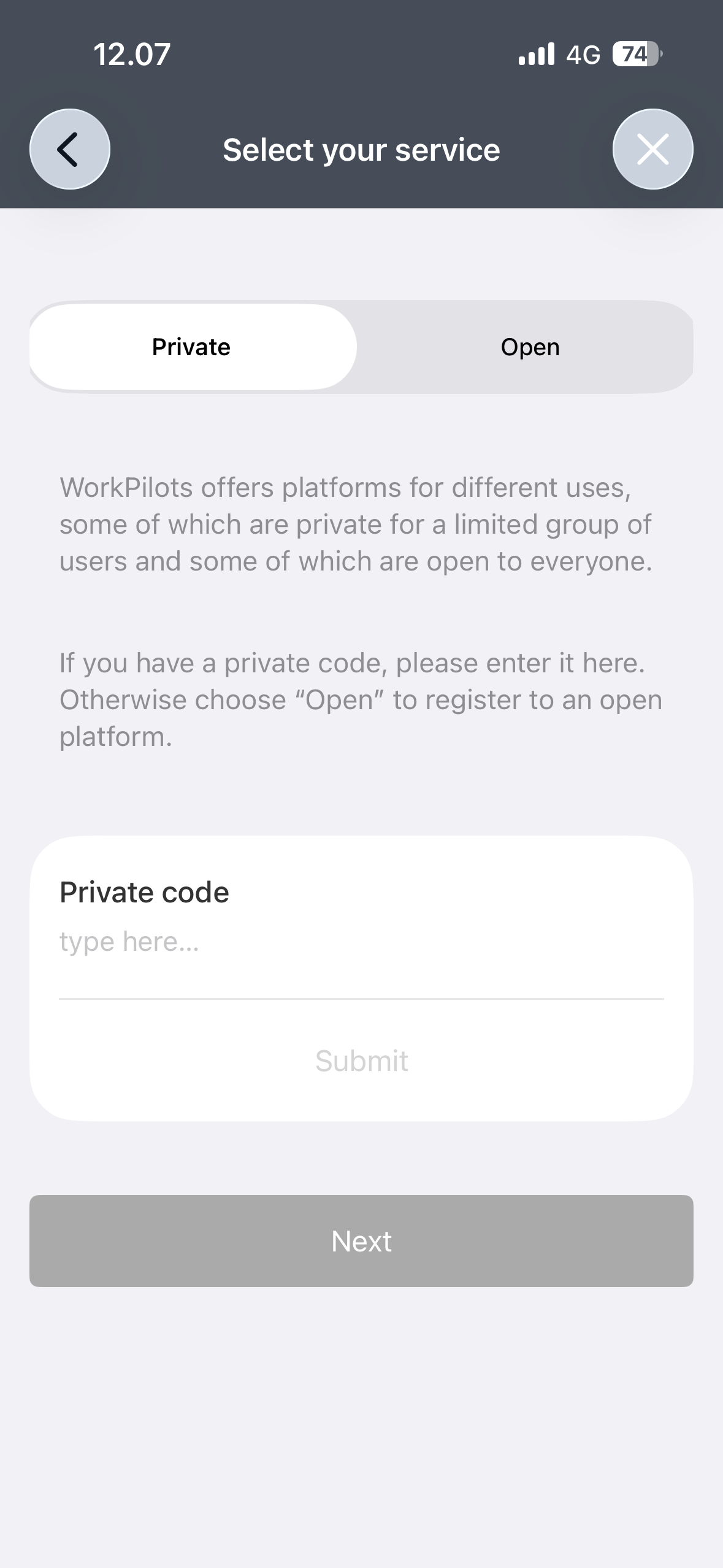
Register to the service. On the page “Select your service” write the required private code BRIDGE to register to the pilot platform.


3) create a profile
Choose role Orderer and fill your profile details: location, profile picture - e.g. your logo -, and an description about yourself or your organization.
Add payment card to your profile on page Payment methods.
4) Post work tasks & select worker
Create opportunities that candidates can browse and apply to.
Click “New order” button
Set the task category.
Set the task duration, time and mark the location on map.
Add task details and payment method. Publish the order.
When someone applies to your task, you will receive a notification. Select as many candidates as your task requires - for multi worker tasks setup up time / person.
5) Approve the work
After the worker has finished the work task, they will mark the assignment as completed and you will receive a notification about it. Approve the task and provide feedback to the talent.
Please check what has been agreed about the payments from the contract you received.
Done. Congratulations! You have helped a young talent towards sustainable livelihood. You can post another assignment to another candidate or target your next task to the same person - based on one’s email address.
More information:
General instructions for WorkPilots service
Need additional help? Submit a request to WorkPilots customer support or send email to info@workpilots.com